What is a Project Position?
Where does the Project Position come from to start with?
Examples of when you may need to update a Project Position
How to update the Project Position
What is a Project Position?
Project Position is another word for Profile but it is specific to how a resource is working on a single Project, not just their job title.
Where does the Project Position come from to start with?
Initially, if the Resource is allocated to work on the Project from Resources > Planning > Scheduling, their current Profile will be used. If the Resource has "Grant Access" used the Profile is selected manually from a drop down list.
Examples of when you may need to update a Project Position:
- If Grant Access was used and the wrong Profile was selected, it can be updated.
- If a Resource changes roles / profiles since originally being allocated to a Project
- If a Resource is working on a Project in a different capacity to their current profile (e.g. normally they are a developer but for one project they need to log time acting as a technical consultant).
How to update a Project Position?
1) Go to the Project and locate the Resource
You should be able to find the user in one of two places:
Project > Project Home > Team tab
Project > Admin > Project Users
2) Double click on the Resource to see the General Information tab
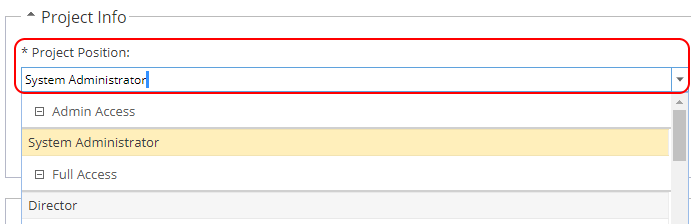
3) In the Project Info section update the Project Position
Double click to edit and select a new Profile from the drop down options
Click Save to update