To log time on a Project the Project Status must be Live and the Schedule must be Published.
Checking Timesheets Enabled:
There is a setting to Enable Log Times found on PMO > Projects List > + New or via existing Projects on Project > Admin > Preferences (Tracking Type):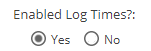
Checking Project is Live:
There are various views in the system which will show the Project Status:
My Space - Overview (My Projects Widget)
PMO - Projects List
PMO - Projects - Project Details
Project - Project Home - Overview
The Project Details or Project Overview screens will have a button with the option to change the Status: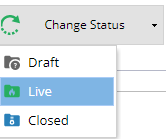
When you change the Status of the Project to Live you will also have the option to Publish a Schedule.
Checking Schedule is Published:
Take a look at Project > Schedules > Schedules List and check the Status.
We also have a guide on how to publish a Schedule.