Hydra caters for Internal Users operating within a company, and External Users such as Customers or Third-Parties
Internal Users
This type of user typically interacts with a project, and are generally assigned to task work. They are treated as internal to the company operating Hydra, such as Project Managers, Engineers or PMO users.
External Users
These users are typically Customers or Third-Party users that either need to be involved in a project, or simply just for view-only visibility. These might be contractors being assigned to task work and logging time, or perhaps stakeholders for a customer that just need to view a project dashboard in.
Licences
There are 5 different licence types in Hydra, Admin Access, Full Access, Project Control Access, User, & External User. The Licenses govern the upper limit of what a Company Profile allows within.
Company Profiles
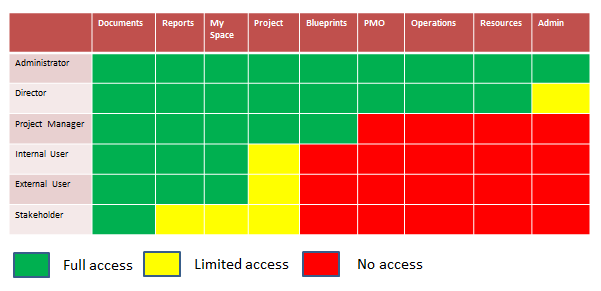
Hydra provides default company profiles for users based on the Licences, the defaults are;
- System Administrator (Admin Access)
- Director (Full Access)
- Project Manager (Project Control Access)
- Internal User (User)
- External User (External User)
- Stakeholder (Restricted Access)
You can also create your own Company Profiles. These have to be based on one of the License types but will allow you to precisely control who has access to what within the system.
Default Licence configuration