Tracking Type is a setting in Hydra for using time sheets.
Ad-hoc Project
When you click + New to create a new project the system will automatically show the most common settings used:
Project created using a Blueprint
Go to Knowledge > Blueprints > Template Project
Go to Admin > Preferences > Tracking Type
On the right hand side you will see the Configuration Details panel.
Double click on the radio buttons to be able to edit the settings.
Click Save on the left to keep the new settings.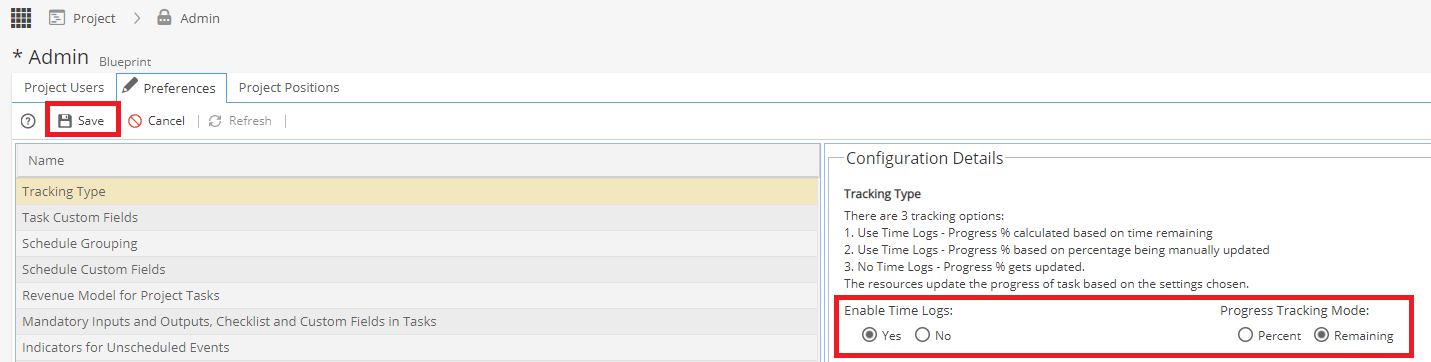
Future projects created using this blueprint will now apply these settings.
Project created via a Bulk Upload
If a blueprint is used the settings will be taken from the Template Project, otherwise the default option for Ad-hoc projects will be used. The settings can still be updated after the project has been created.
What do I do if a Project has been created with the wrong option?
For a single project, go to Admin > Preferences > Tracking Type and update the Tracking Type options.
If the Project was created using a Blueprint, check the Template Project has the correct settings your company wants to use as a default.