What is a Checkpoint?
A checkpoint is a flag added on top of a Task, to help with reporting by giving you a % complete of a phase.
How do I know if a Task is a Checkpoint?
The Task will show with a red flag icon  (instead of a blue spot) with the Checkpoint Flag Name in brackets (after the Task Name)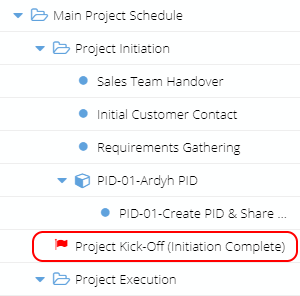
The Task Details page will remind you if the Task is a Checkpoint on the bottom left: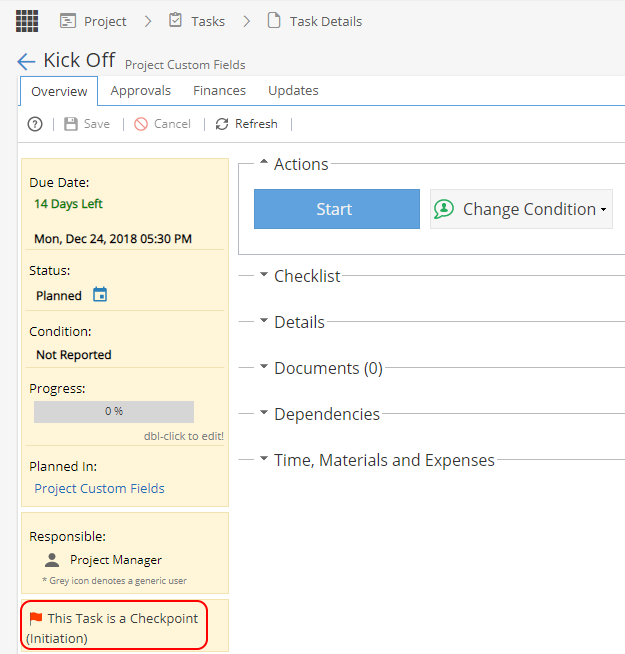
How do I add a Checkpoint?
From Project > Schedules > Gantt when you right click on a Task you will get the option to Mark as a checkpoint with a list of flag names to select from.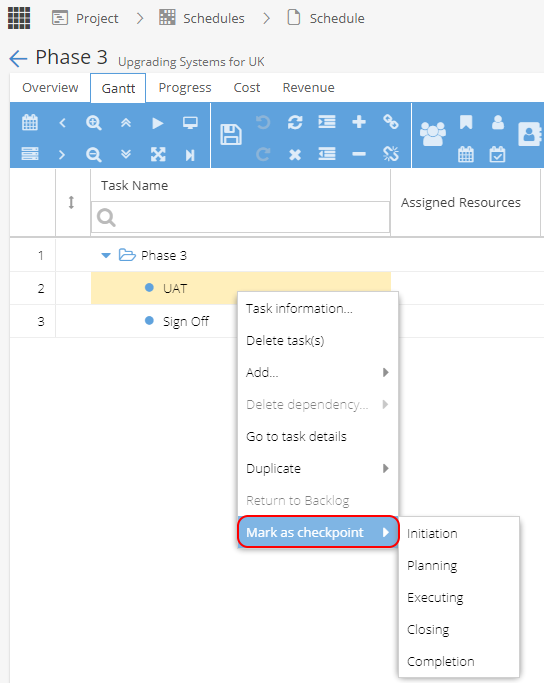
Where do the Flag Names come from?
Blueprints > Assets > Checkpoints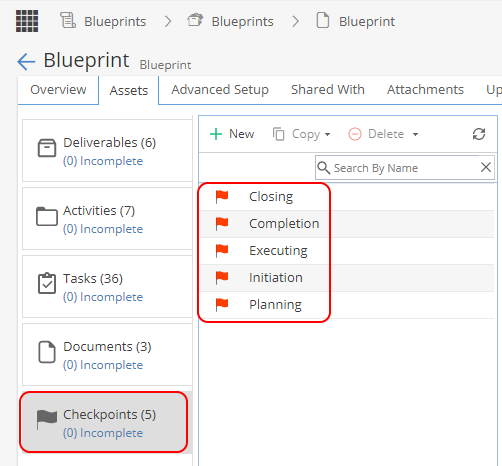
Is there any way I can add a Flag Name without access to the Blueprint menu?
The only checkpoints available to you will be the ones defined in the Blueprint.
Your company will need to review the Blueprint Assets if they need to be updated or you can look at using Milestones for your Project instead.
How is the completion % for a Checkpoint worked out?
Checkpoint completion is based chronologically on any previous tasks, including the flagged task (based on date, not the Gantt row numbers).
The total effort (time) recorded on tasks divided by the total effort required.
Example: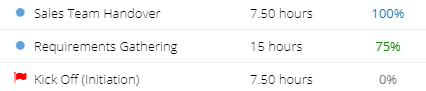
Effort recorded = 7.5 + (15hrs x 75% = 11.25) = 18.75
Total effort required = 30 hours
18.75 / 30 hrs = 62.5%
The report widget would show this rounded to the nearest %:
How do I remove a Checkpoint?
Right click on the flagged task and select "Unmark as Checkpoint"
How do I mark a Checkpoint as completed?
The system will show a checkpoint as 100% complete when any chronologically previous tasks, including the flagged task (based on date, not the Gantt row numbers) are completed.
Where can I see Checkpoints in Hydra?
Company Dashboard > Report Widgets > Checkpoints
Project Dashboard > Report Widgets > Checkpoints
PMO > Projects > Checkpoints
Blueprint > Assets > Checkpoints
Project > Tasks > Task Details
Project > Tasks > Task Lists (*Filter on Task Type)