Note: Hydra can provide some guidance on how to manage Change Requests
but remember to confirm if your company has any specific processes to follow.
Suggested Process to manage Change Requests
1) From the Project > Finances > Budget tab
Create a separate budget category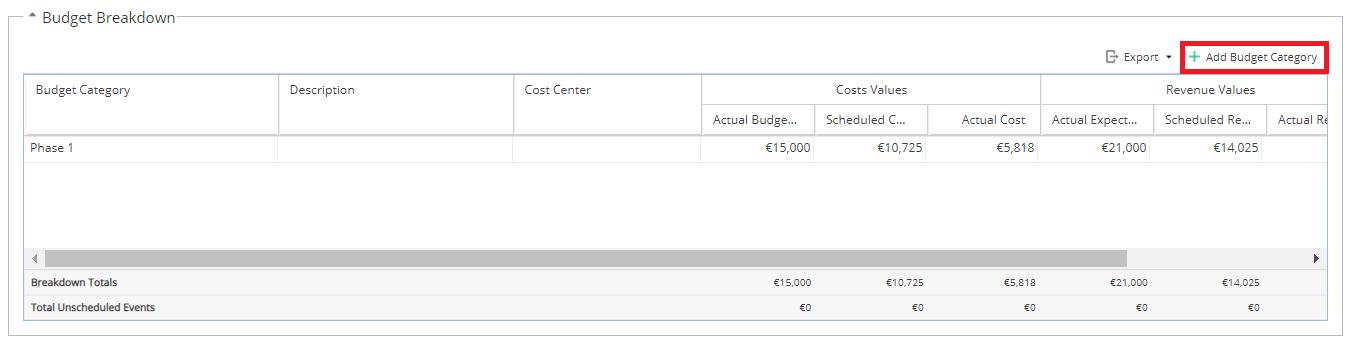
2) From Project > Schedules > Schedules List
Create a new Schedule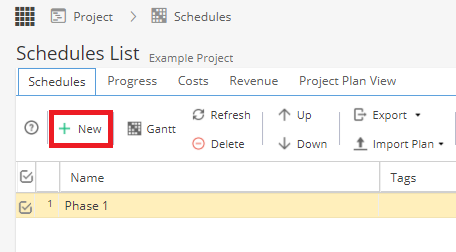
3) Double click in to the new Schedule
Go to the Project > Schedules > Schedule Detail > Overview tab
Expand the Budget Category section.
Double click in this area to be able to make edits
Select the radio button for "Set all tasks to Budget Category"
On the right hand side select your Budget Category in the drop down list
Click Save at the top left.
4) Plan your Tasks / Deliverables and assign Resources as you would normally in the Gantt of your change request schedule.
Remember the Schedule will need to be published before Tasks can be updated / Resources can add time.
- The Project > Finances > Budget tab will automatically update to show costs / rates for work in the Change schedule.
- You can also add the Budget Category column to the Timesheets Report.
- It is also possible to go to your original schedule and create an Outside Predecessor linked to the Change Request schedule.