Effort Driven
Fixed Duration
Dynamic Assignment
Where can Scheduling Modes be seen?
How do I update the Units %?
Effort Driven– Specify a number of hours required to complete a Task.
Examples of Effort Driven Task:
The duration will only update once a resource is assigned:
When one resource is assigned, their calendar will now calculate the duration of the Task and update the finish date and time:
When multiple resources are assigned, the system will calculate and update the duration and finish date: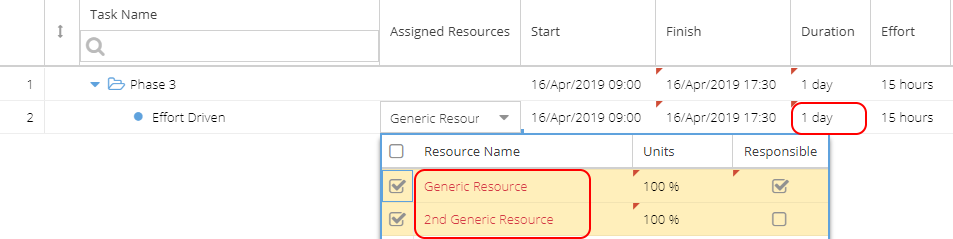
Fixed Duration– Good to use for tasks which are a fixed length of time regardless of the number people involved e.g. Meetings.
Examples of Fixed Duration Task:
The effort will only update once a resource is assigned:
When a resource is assigned, the system will use the calendar to work out the effort of the Task but the start / finish times will remain the same as the duration is fixed.
If multiple resources are assigned, the start and finish time will remain the same but the effort is added for all resources involved: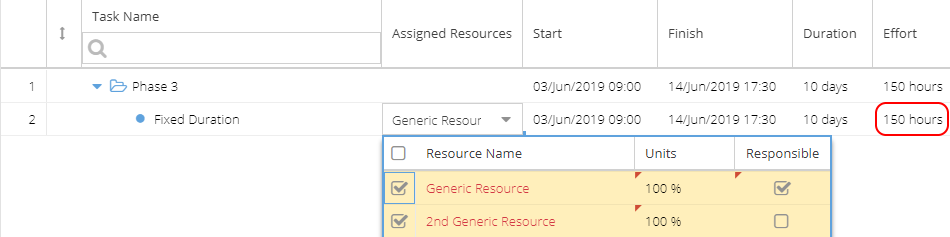
Dynamic Assignment – A mixture of duration and effort, e.g. you could have a task that will take 6 hrs but would have to be done over 2 days.
Dynamic assignment offers more flexibility but is not compatible with delegation and may cause some reporting anomalies.
Examples of Dynamic Assignment Task:
When no resources are assigned the duration and effort will still be populated because you have specified this information:
When a resource is assigned, the system makes no changes to duration or effort. Dynamic Assignments will not account for holidays, you specify exactly when it starts and ends:
If multiple resources are assigned, the task will be split between them: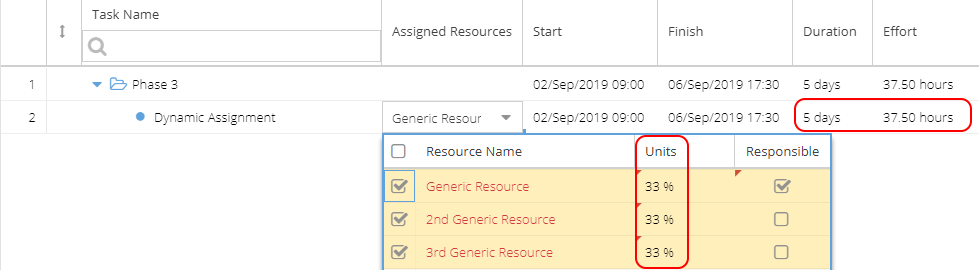
The Task Details will show estimated hours split between the resources.
Where can scheduling modes be seen in the system?
Project > Tasks > Task Details > Overview (View Only in the Details section)
Project > Schedules > Gantt > Task Information (*Advanced Tab)
Knowledge > Blueprints > Blueprints > Assets > Tasks (*Overview Tab)
Knowledge > Blueprints > Blueprints > Advanced Setup > Size
How do I update the Units %?
For Tasks using Dynamic Assignment, the Unit % is calculated by the system using the Effort, Duration and Resource availability.
You can manually override the Units if using Effort Driven or Fixed Duration Tasks.
Remember this is also affected by the Resource's allocation to the Project and their calendar availability.