The Advanced Setup > Size menu allows you to update the scheduling mode and time it will take to complete a Task.
Along the top you can:
+ Add - Create a new Task (This will appear as Incomplete in the Assets > Tasks)
- Delete - Delete a Task (This will delete the Task from Assets > Tasks)
Save any changes made
Refresh the screen
Cancel changes
Click on Advanced Management to get a view including different options for complexity: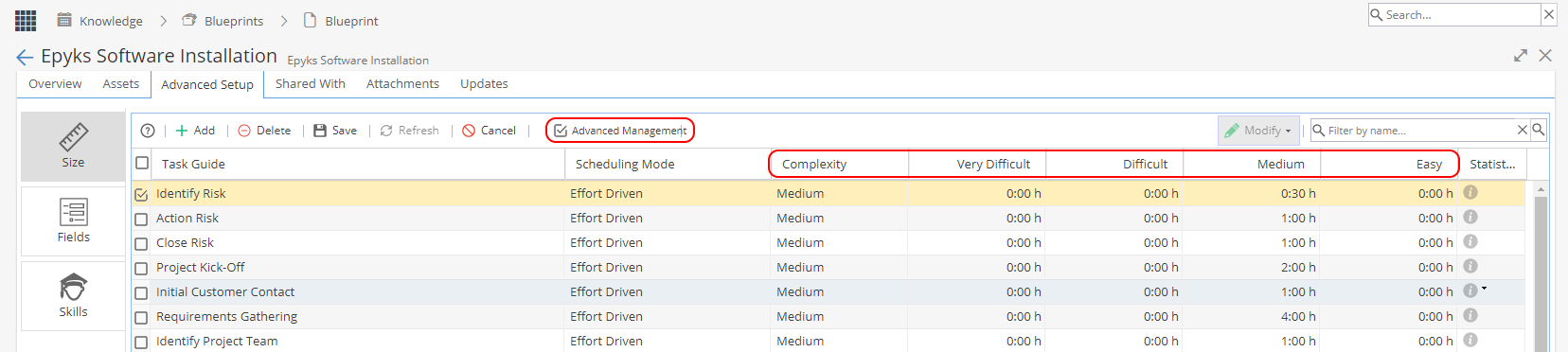
On the top right you can:
Modify - If multiple Tasks are selected the button will become available to allow you to update the scheduling mode in bulk.
Filter the task list by searching for partial name.
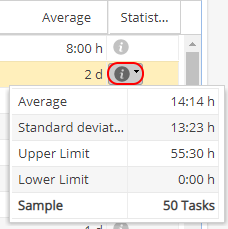
On the far right hand side you have an information icon to give you statistics, showing the average time, standard deviation, upper and lower limits and how many tasks the sample is based on:
When reviewing your Blueprints these statistics can help ensure accuracy.