From the Gantt you will see an icon which looks like 2 sheets of paper.
This button allows you to set up recurring tasks.
A pop up window will appear for Recurring Tasks on the Settings tab: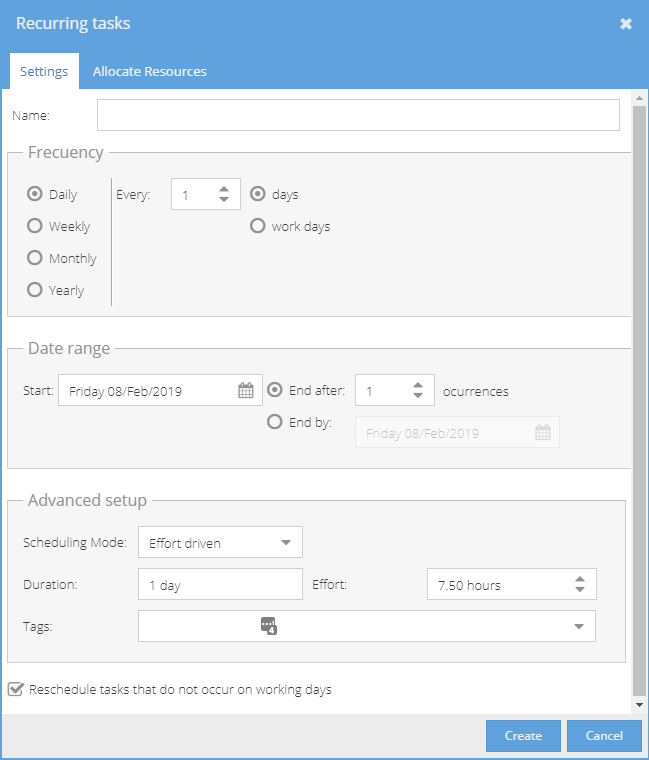
Set the Name of the Tasks.
Set the Frequency
Choose the Start Date and when to end the Tasks (on a set date or after so many occurrences)
Set the Scheduling Mode / Duration.
Add a Tag (set from Project > Admin > Preferences > Tag Management)
Set if you want the system to reschedule a Task if it does not fall on a working day.
Go to the Allocate Resources tab.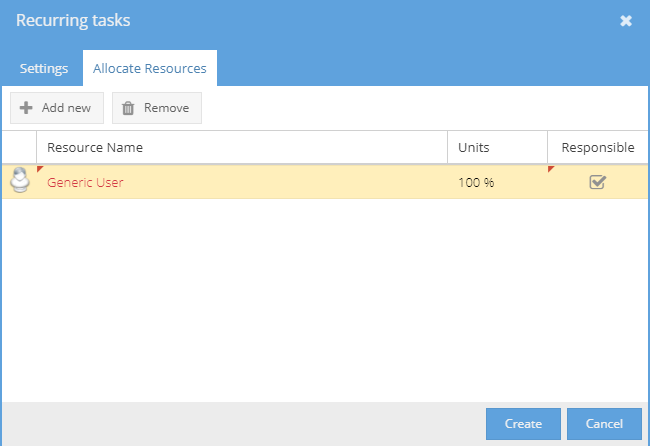
Add / Remove Users (Generic or Real) already working on the Project.
If you want to come back to this later, you can leave this blank and still create the tasks.
Click on the Create button.
The tasks will be created and grouped together under an activities folder:
Remember to click on the Save icon to keep the recurring tasks.