The Costs tab in the Schedules List shows you a high level view of the costs of each of the Schedules in your Project.
To view the Details of a Schedule's Costs, you can double click on the name or select a row and click the View icon.
On the top right hand side you have several options:
- Export the file to your preferred format
- Quick Search - Drop down filter to search for Project Tags
- Quick Search - To search for Schedule Name
- Display - Filter on Schedule Status (Published, Unpublished, Closed, or All)
*The list of Project Tags available are set up under Project > Admin > Preferences > Tags Management
In this view the available columns are:
- Name - Name of the Schedule
- Predecessors - If the schedule is dependent on any of the others in the Project
Understanding Costs:
| Initals | Name | Calculation / Formula | Notes |
| BAC | Budget at Completion | For each Task within Schedule: Hourly Cost of Resource x Estimated # Hours to Complete Task + Cost of Materials |
The sum of all estimated costs for all Tasks within the Schedule. |
| PV | Planned Value | BAC x Planned Progress | Hours Planned to Date x Cost Per Hour & Material Planned Costs. To Date (Today's Date) |
| EV | Earned Value | BAC X Actual Progress | Total cost of work completed to date EV can never be more than Planned but can be under. |
| AC | Actual Cost | Time logged (to date) x Hourly Cost of Resource + Cost of Materials |
Shows total cost of works logged in Schedule to date. If this shows as £0 but has been completed check the time type used. |
| EAC | Estimate At Completion | (AC + ( BAC - EV )) / CPI | Replaces the BAC for the amount that the schedule is now believed to cost when it is completed |
| ETC | Estimate To Completion | ( BAC - EV ) / CPI | Estimated Cost to complete the Schedule |
| SPI | Schedule Performance Indicator | EV / PV | The efficiency of time utilised in the Schedule. Lower than 1 - Ahead of time Greater than 1 - Work taking more time than expected. |
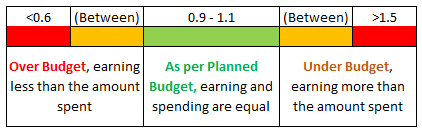
| CPI | Cost Performance Indicator | EV / AC | The efficiency of Resource utilisation of the Schedule. Lower than 1 - Spent less than expected Greater than 1 - Costing more than expected. |
Understanding where Costs / Time are held:
| Estimated # Hours to Complete Task | Project > Tasks > Tasks Detail > Overview > Time, Materials & Expenses > Estimated |
Project > Tasks > Task Details > Finances > Task Finances > Estimated Values |
| Hourly cost per Resource |
Project Level |
Company Level Resources > Profiles > Costs and Rates |
| Cost of Materials *Name set under Blueprint > Assets > Tasks > Configure |
Project > Finances > Resources Sheet |
Estimated / Actual Quantity Project > Finances > Expenses and Materials |
SPI Colour Coding: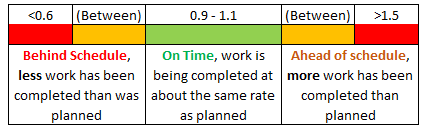
CPI Colour Coding: