The Resource Sheet lists all resource on your project and allows control over their individual costs and rates.
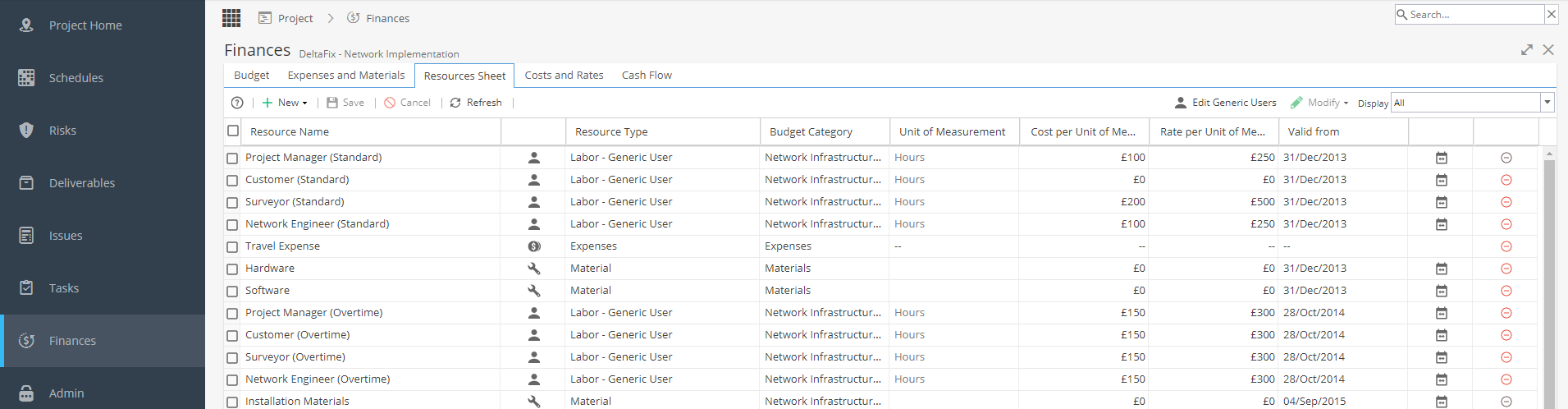
The table lists the following information:
Resource Name - You can change Generic resource names by double clicking within this cell.
An image and the name of the Resource Type:
 |
Labor - Named (Real) User |
 |
Labor - Generic User |
 |
Material |
 |
Expense |
 |
Credit Note |
The Budget Category that any time registered by the resource will default to.
This will be taken from the default option selected from the Budget tab.
Double click to change.
Unit of Measurement:
| Labor | Hours |
| Expenses | -- |
| Materials | (Double click to edit) |
Cost per Unit of Measure - Can be edited to change the resource's or material cost
Rate per Unit of Measure - Can be edited to change the resource's or material rate
Valid from - A date can be provided for when the Cost and Rate takes effect. Set this to the beginning of the project if you wish the values to apply to the entire duration of the project.
 The Valid From date must be before or match the start date of any tasks assigned to users otherwise the costs and rates will show as £0
Costs/rates timeline table icon  - opens a popup with a list of costs and rates for given periods on the project.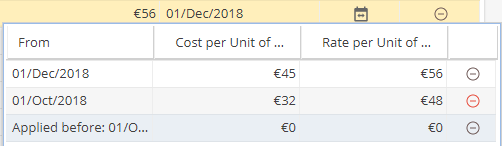
The Remove button can be used to remove generic resource(s), expenses or materials from the project.
You can not remove any records for Real Resources.