The Gantt's Contextual Menu is displayed when you right click on certain objects within the Task Table.
The below show the menu you get when you right click on a Task:
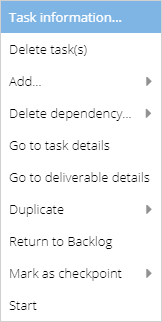
Task information - Displays the Task information screen.
Delete task(s) - Deletes the selected tasks from the schedule.
Add... - Allows you to add tasks above or below the selected item, add milestones, or add tasks as successors or predecessors. Sub Tasks can be added to Deliverables and Activities.
Delete dependency... - Allows you to remove dependencies associated with the task. Greyed out when no dependencies exist on the selected object.
Go to task details - Opens the Task Details screen. Disabled for Deliverables and Milestones.
Duplicate - Allows you to create up to 10 duplicates of the selected task.
Return to Backlog - Returns the task to the Backlog. Not available for Milestones.
Mark as checkpoint - Sets the task as a checkpoint.
(Will show as Unmark as checkpoint if Task is already a Checkpoint).
Start - Starts the task. Once started, this option is replaced by Completed and Cancel which allows you to set a task as complete or Cancelled respectively. These options only appear for tasks.