You can create new Risks from the Project
Go the Risks menu on the left hand side
Click + New
This will give you a version of the Overview tab to start adding some information:
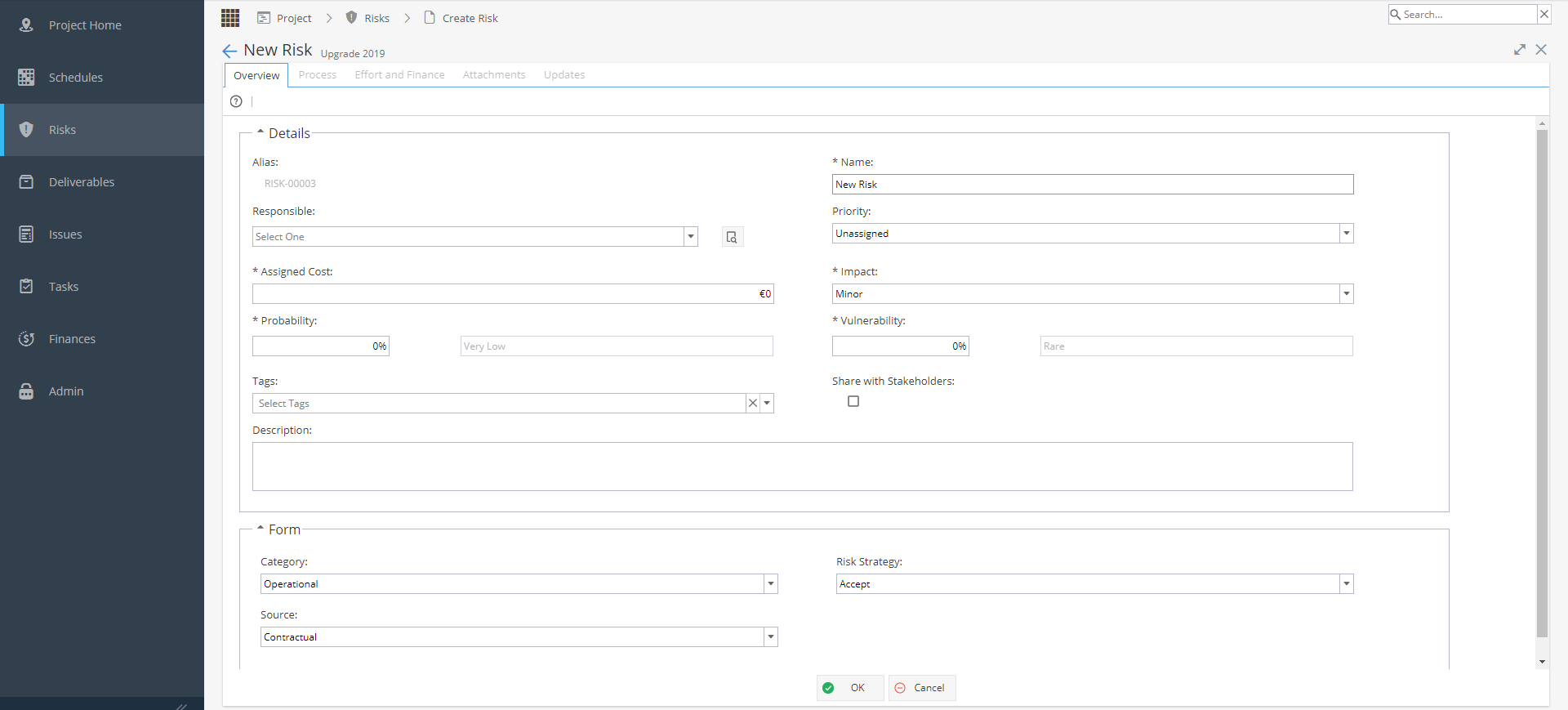
Details
- Alias *Usually system generated, depending on settings under Admin > Configuration > Company Preferences > Automatic Alias
- Name of the Risk
- User Responsible
- Priority
- Assigned Cost
- Impact (Minor - Catastrophic)
- Probability % (% decides if classed as Low / Medium / High)
*Impact x Probability affects the Risk Matrix which will show on the main Overview tab - Vulnerability % (% decides if classed as Rare / Low / Moderate / High / Very High)
- Tags *Optional based on Tags list from Project > Admin > Preferences - Tags Management
- Share with Stakeholder?
- Description
Form
Drop down selections for Category, Risk Strategy and Source
These fields are set as visible / mandatory in Knowledge > Blueprints > Assets > Deliverables under the Fields tab.
The drop down options available are set under Knowledge > Blueprints > Advanced Setup > Fields
Once you click OK to create the Risk, you will be taken back to the full view of the Overview tab which includes additional information such as the Risk Matrix.