How do I check if there is an error?
From the Bulk Processes section, you will see the status showing with one of three icons:
Green Tick, Red Cross or Yellow Warning Triangle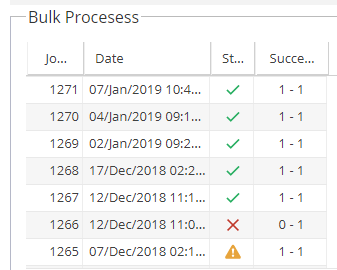
If there is a cross or triangle we need to take a further look.
How do I get the details of the error?
1) Click on the row with a cross / triangle in the processes menu (top left)
2) Click on the row in the bulk sub-processes menu (bottom left)
3) Expand any rows in the bulk sub-process records section (right hand side) to see details of the error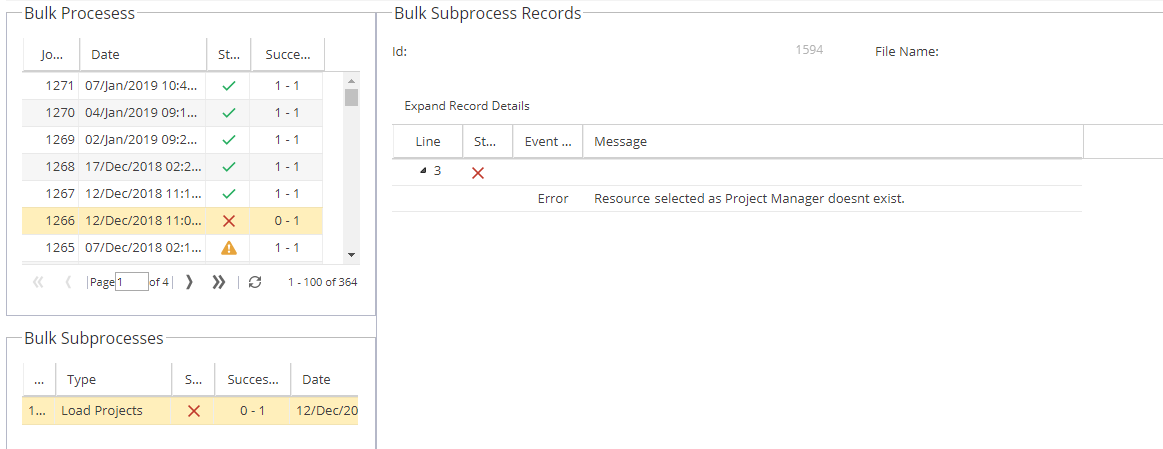
What type of errors will be picked up?
- Resource selected as Project Manager does not exist
- Project date range is not valid
- A Project with the selected name already exists
- Tag was not found
- The size of the alias must be between 3 and 21.
- Data type conversion error for field (e.g. expected value was No but data was N o)
How do I resolve these errors?
Review each error and check the data in the upload file.
If the Project name already exists, adjust the name to make it different.
If the Resource does not exist, check they are in Hydra and the email address is correct.
Once you are happy the issues have been resolved, you can re-run the upload.