The Teams view allows you to create and update teams by defining a resource's manager or delegate so another resource can make timelog approvals on behalf of a manager e.g. to cover annual leave.
The list can be filtered by Status (Active, Deactivated, All) or exported to a CSV, PDF or Excel file.
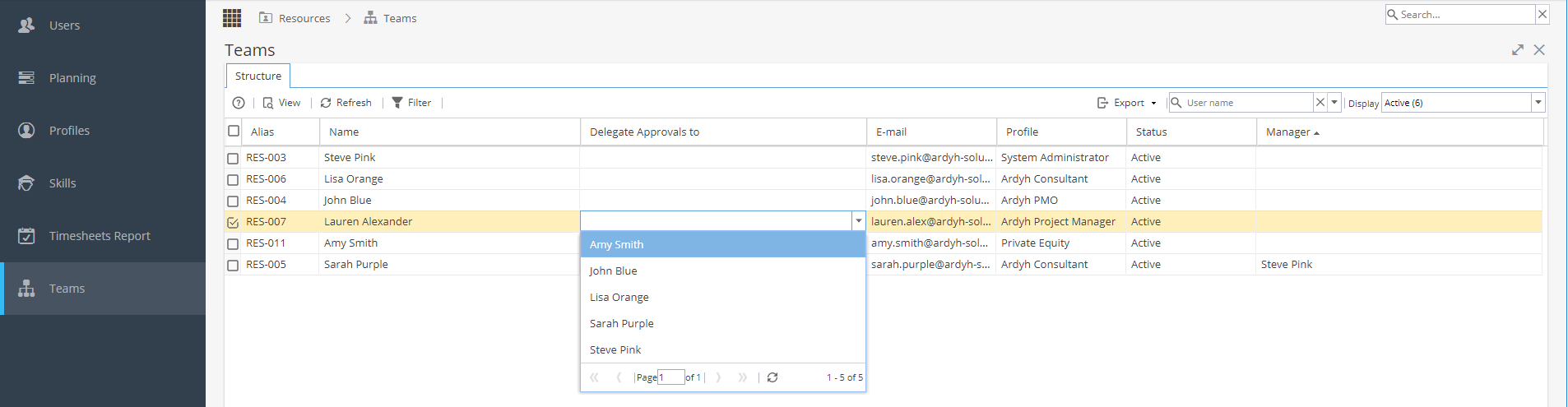
This view shows the following information:
Alias - The resources code.
Name - Full Name of the resource.
Delegate Approvals To - The resources delegate - Double click for a drop down list to select from.
*Remember if using Delegation, all approvals will be sent, not just a single Project.
This delegates access where the resource is responsible to action approvals, not to approve the selected resource's own time logs (you would need to have delegation for their manager).
When setting up a delegate they will be able to see any pending approvals but not entries already approved.
E-mail - The resources email address.
Profile - The company profile the user has.
Status - Whether the resource is active or has been deactivated.
Manager - The resources manager (will be sent approval requests).
Double clicking on a Resource will open the Resources > Users > General Information tab where most edits would be made.