The Library is split into two tabs, Company and Projects.
The Company Library tab will show Documents added as Attachments (or Updates with Attachments) to areas outside of a Project such as Customers or Resources.
The Project Library tab will show Documents added as Attachments (or Updates with Attachments) to areas within a Project such as Tasks or Risks. 
(Note: A Project will not display any Documents stored within a Company Blueprint, only Documents stored at Project level)
Double click on a Project to view the Project Folder.
On the top right hand side you can use the drop down next to Show to filter by Project Status: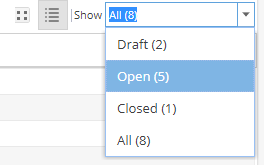
You can use the icons  to switch between Grid View / List View